torsdag 13 mars 2014

Fly City 2.0

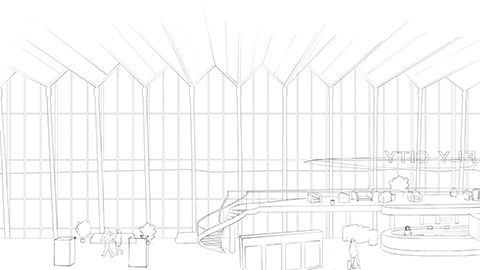
I have just finished the drawing of Ms X and the colouring of Fly City which will be the background of the main menu of "Terminal" and I thought I would just show you how it turned out. First a little recap of what it used to look like.


Here it is complete with colour and Ms X.


The colours I have picked from our mood board, trying to incorporate the colours (pinkish) purple and turquoise that we have chosen for "Terminal". I have used a colour layer to create a base and then added the sunset and light on top of it.

The sunset is consistent of three gradients, one colour layer, one colour dodge layer and one linear dodge layer, the latter one I have placed on top so that it lights up the character slightly. I have also placed a copy of the base colour layer on top of her on low opacity so that she will blend into the purple light better and put "inner shadow" on her to create the rim light from the sun by changing the colour to the colour of the sun and the mode to colour dodge.

For the lights I have played around with linear dodge on both layers and brushes.

fredag 7 mars 2014

Ms X

Yesterday I started on the first real depiction of our main character, known only as Ms X, which is to go on the main menu. I started with a rough sketch which I have reworked into clean line art, aiming at the style of the Ms Marvel comic, with thin line art that is thicker on the edges. I chose the pose and facial expression since I wanted to capture the essence of the game in the main menu. She is supposed to look worried/scared and like she is trying to get away from something, while showing her feminine personality.

This is how my rough sketch looked and the (almost) final result, the skirt needs some detail, creases and perhaps a seam, and the eyes need some additional clean up, but otherwise the line art is pretty much complete.


For the line art I used a small, hard brush with shape dynamics and quick strokes, pressing ctrl+z until the lines where as I wanted them to be. Finally I used the eraser, again a hard brush, to touch up any lines that were not completely straight, too thick or too long.

The creases of the blouse were a bit tricky and I used Google to find some images of silk blouses for reference which were really helpful. The hair was also a bit of a challenge, I think it is hard drawing hair that looks good, so I should probably practice a lot more. I will get to do that when I start to render this drawing and when starting on the win and loose screens and the intro.

torsdag 6 mars 2014

Terminal: Fly City


After the Alpha we felt that we really wanted to have a main menu for the Beta presentation and moved it up on our priority list. I started right away with doing some really fast sketches, trying to explore different ideas and layouts. Some ideas that we had did not fit the game we are creating, for instance, we had an idea of the interrogation room where the game starts, with a flickering lamp. This put on paper looked like it would fit better on a 1930s inspired mafia or crime game.

Below are some of the sketches I came up with, the two on the top left and the right middle one were the ones I felt fit the concept of the game best as they show that you are at an airport, they show the main character looking worried or fleeing and they fit the comic book theme. The one we chose to work on was the middle one on the top since that was the one that best incorporated everything the game is supposed to be. 


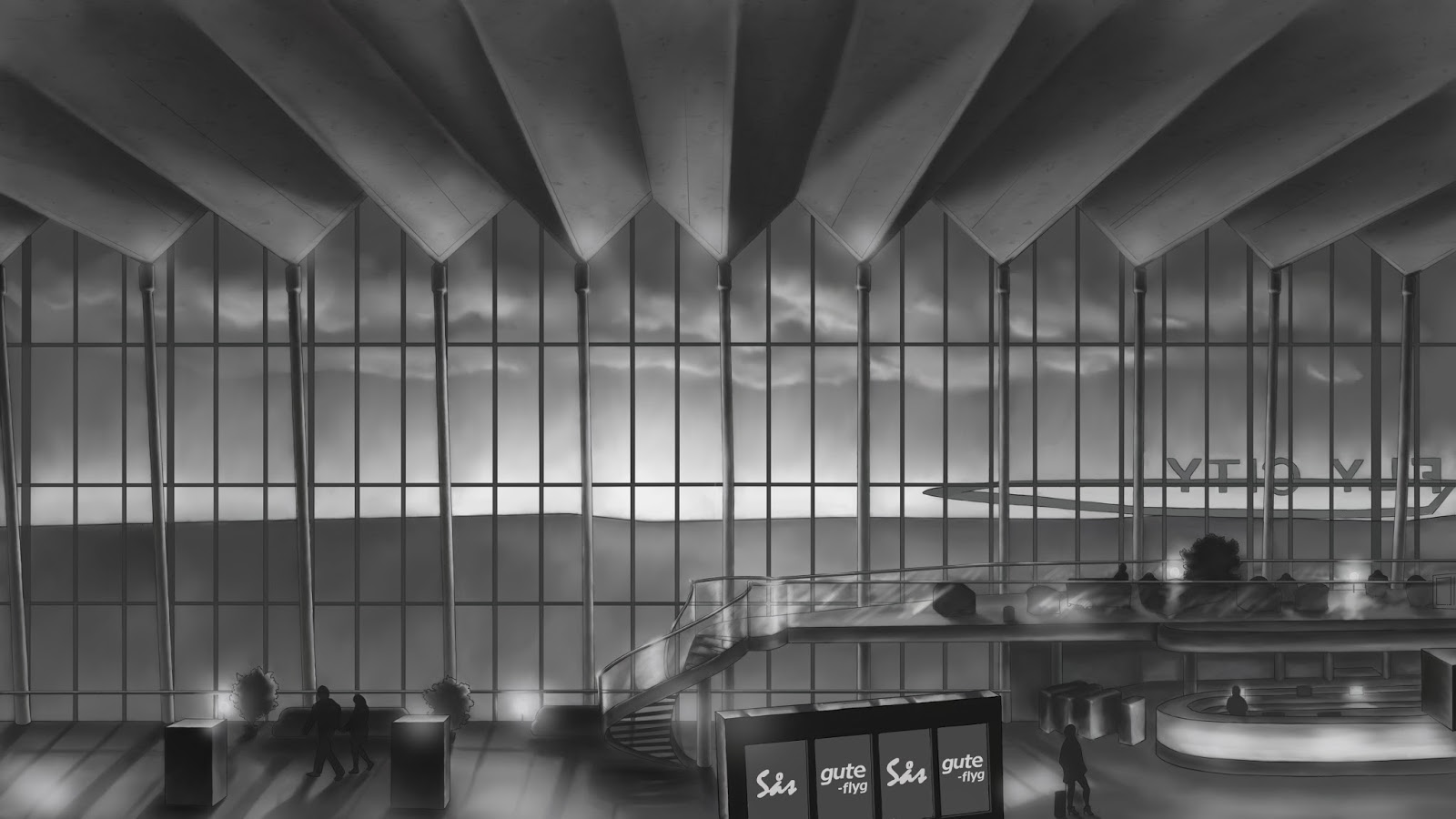
I already had some photos from Sky City in Arlanda in our inspiration folder that I used for inspiration. I felt that those huge windows and the shiny wooden floor was very inspiring and I wanted to create a sunset coming through the windows both to establish the time of day of the game and to incorporate the purple colour scheme we have chosen. For the style of the scene I chose to take inspiration from Ms Marvel, which has very thin line art, lots of smooth gradients, soft highlights and subtle textures.


I spent many hours doing a rough sketch and turning it into clean line art. Since the buttons will go on the left I decided to leave that area a bit empty to keep it from looking too busy. The main character will be positioned in the right part and therefore I chose to put the beautiful spiral staircase between them so it would not be covered. Next thing was getting the basic values down, deciding where the light and shadows will be.

Many hours followed after that rendering it and reworking things that did not look right. The technique I used was to first block out and then use smudge tool to blend them, working over the entire image the whole time and not getting into detail. I went over it several times, each time getting more and more into detail before adding the final touches with highlights, giving more detail where needed. I will show you some of the steps, from line art to finished drawing of “Fly City”, so that you can see how I have been working.


Creating this image took me many hours, I need to practice doing things like this more often so that I will get faster. I have been trying to utilize what I have learnt since I started at GAME, especially line art and atmospheric perspective, making things darker in the top, lighter in the bottom and using more contrast and darker colours closer to the viewer and vice versa.

We have after choosing this design thought about using an arrival/departure sign for the menu, however I feel that it will look empty since there will be only four options on the main menu (originally only three). The space between the buttons will allow us to use more space on the screen without it looking empty and they will still be inspired by an arrival/departure sign.


fredag 28 februari 2014

Gender Equality in the Game Industry

Gender equality is a very hot topic at the moment and the game development industry is no exception, one of the most discussed topics is the case of the female armor. Very often you see in games that male characters are depicted in full armor, looking strong and masculine while the female characters are given armor that barely covers anything; basically she is going into battle in a metal bikini.
Example of Female Armor from Baldur's Gate


There is a growing interest in something different and gender equality is something that is always present in our education and it was the reason for Sveriges Television's (SVT) visit to the university day before yesterday to make an interview on the topic. It was aired today and although I was sure they did not point the camera in my direction there I was in the background. Here is a link although it is in Swedish only: Här utbildas framtidens spelutvecklare.

 As mentioned it is a very hot topic and very much integrated in our education, we are asked to educate ourselves on the topic and every choice we make we have to be able to explain why we chose the way we did. The one thing I am thinking about now is when we got the question whether we only had male guards in our game during the alpha presentation. There are a lot of people who do not think that things need to be changed but I believe that there is a growing desire for something different; we have seen it before and there are a lot of people who want to offer the players something new. This will create a greater variety in the supply of games that is available. The most important thing is always to keep in mind that every choice you make sends a message to whoever comes in contact with your work and make sure that you can stand by your choices.

torsdag 27 februari 2014

Being shot

This week I have, among many other things, worked on an animation of the main character being shot. It turned out to be a rather tricky thing, I tried to imagine how the body would react if being hit by a bullet and tried to sketch it really fast. I experimented with movement in her arms, making them go up in front of her body but it did not look good at all and I soon realized that I should probably attempt a subtler approach.

This is a test that I threw together super fast to test how it could look if I tried showing the impact of the bullet in her arms, as you can see it did not look very well and after some additional attempts with the idea I decided to go in another direction.


The player experience needed to be more important than it being exactly accurate and since the game is already hard, and the fact that it is just outright annoying, it did not want to make the player have to wait and watch a long animation when being shot, instead of being able to flee. Therefore I thought of making something similar to the recoil of the animation I made of her shooting a rifle, it is clear and fast so the player gets the visual feedback of being shot and can quickly continue playing.

As usual I think it would have been good to have reference photos, instead I tried searching Google and YouTube for people getting shot, although I was a bit reluctant to check most of them out since I was a bit concerned about what I would get to see. I did find a video tutorial for special effects where I got to see someone acting that I thought I could draw inspiration from.

Then I started drawing up my recoil-idea, trying to feel the movement in my own body. I decided to push her body to the side and back and her head forwards and downwards. This was to simulate her taking a bullet in her right shoulder/side from the front. Once I got the idea down the animation was actually really simple. The challenge was to make it look like she was being hit while keeping it subtle enough not to irritate the player. This was also a reason that I chose to not move her arms much as I thought having her arms flapping about would only be annoying and over the top, especially when she is so small on the screen. Less is more was my key words when creating this animation.

Here is how it turned out when finished in colour.


If I was to do this again I would study more references and I think I should probably create additional animations, e.g. her being shot from the back but all in all I am happy with what I have created.

onsdag 26 februari 2014

Colour

Today we have studied light and colour theory, going through how light behaves and determines the colours. To study this we got to look at a lot of photographs of different environments, lighting and surfaces. This as well as getting to see an amazing artist create beautiful scenes and landscapes super fast was really interesting and I was inspired to try it for myself. After waiting all day we finally got to the practical part where we were asked to choose a triad (one colour and two colours adjacent to its complementary colour) of colours from colorschemedesigner.com and colour a very simple drawing of a face using the two similar colours as midtone and shadow and the third one for light. I chose to go with a dark purple for shadow, a cold blue for midtone and light yellow for light, I kept in mind what I learnt today about colour being more saturated in shadow and desaturated by light.

This is the image we got to work with.


We had about an hour for this assignment and this is how it turned out. A tip we got was to create a black and white filter so that you can see if the values look right since it is easy to get confused by colours and you can see the result of that underneath.


I am feeling really inspired to continue working with colours and I will try to put all that I have learnt so far into the background image for Terminal that I am working on at the moment.

tisdag 25 februari 2014

Speed Painting

Today we had a lecture with Felicia about values and a little bit about Photoshop. We looked a little bit at different brushes and brush settings and experimented with using brushes in color dodge and linear dodge mode. We also looked at some short films showing the difference in hue, saturation and value and how you can create environments really fast in gray scale using foreground, middle ground and background.
After lunch we got to do some exercises using what we learnt earlier. We were shown photos of mountain landscapes in gray scale and given fifteen minutes to draw it. The purpose of this exercise was to start thinking about value when drawing, it also makes you think about contrast and how to use atmospheric perspective.

This was the first one, I think it looks a bit flat as time went by really fast.


Here I realized I needed to work faster and I managed to get some atmospheric perspective into it. You can see that the further back something is, it has less contrast and is lighter while the foreground is the darkest part. Also you can see that the mountains are darker at the top and lighter at the bottom, creating contrast to the next level of mountains' dark tops.


This one did not turn out very well, it was a picture of treetops with thick mist between them and time just ran out way too fast. I should probably have used the tree brushes instead as I would have been able to do more a lot faster, I should also have used a different brush for the mist. My attempts at atmospheric perspective got lost somewhere in the mist.


This is the final one, a picture of snowy mountain tops. I think it looks ok but it could definitely use some more work to it and I am not too happy with the contrast between the grounds in it, it should be clearer what is in the foreground. In general I think it reads well though, especially when you zoom out a bit you can clearly see the snow coming down the mountain side.


I think it was a good exercise and it is definitely something I should practice more. I had thought of doing this with the background image I am working on for our game and now I am sure I will. I think drawing it in gray scale first will improve the quality of the values in the image greatly since it is not something I am very used to working with or thinking of.